Multilingualism
Multilingualism on the corporate portal is implemented as two independent modules:
- Content Localization
- Interface Localization
Language Selection
The application language is selected in the user menu:
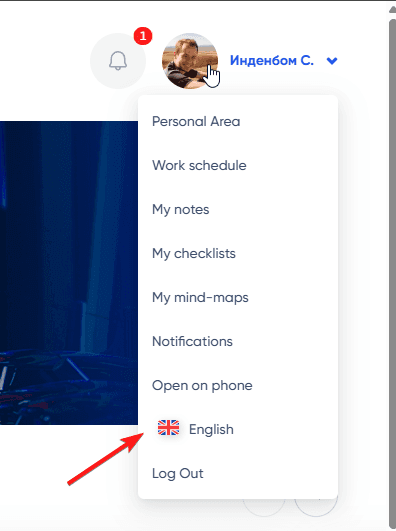
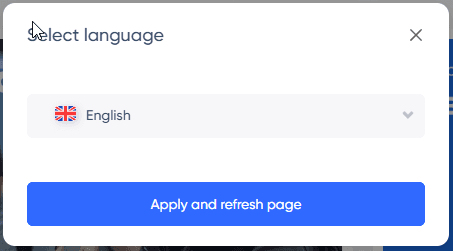
The selected language is saved in the current user's settings and applied globally.
Interface Localization
Interface localization includes translations of:
- Button labels
- Headings
- Menu items
- Error messages
- Notifications
- Tab titles
- Section titles
- and much more that is built into the application and not editable by users
Localization files are stored in the application code and are added by the development team as support for new languages becomes available.
When new functionality is introduced, it is immediately translated into all supported languages.
Default Language
If a label has not been translated into a specific language for any reason, the default language—English—will be used.
The development team always creates new functionality primarily in English, and then translates it into other languages as needed.
Translation Errors
Generally, labels are initially translated by neural networks, and they may sometimes not match the context. If you find such an error, please report it to the corporate portal development team.
You need to take a screenshot of the page with the label, copy the original text where the error exists, and provide a link to the page where you found that label. Additionally, you should indicate the correct wording and provide an explanation of the error.
Content Localization
The corporate portal supports a system for localizing user data. For example, multilingual values can be edited in such places as:
- Department names
- Article descriptions and titles in the Knowledge Base
- Job titles
- and much more
The ability to add localization for content is enabled as needed and requires some modifications in the interface, code, and database. By default, not all objects support localization. This capability is added as necessary.
Localization Form
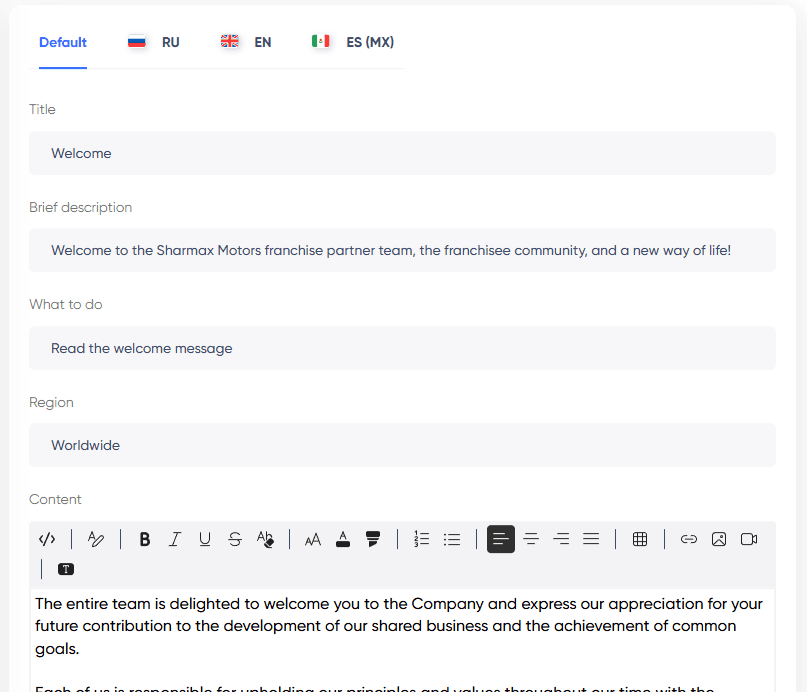
The localization form works universally in all areas of the application. It contains several tabs:
- Default Data
- Languages supported by the application
Default Data
First and foremost, before adding a translation for any entity, you must fill in the default data. This tab may contain several fields, among which there may be mandatory fields, such as "Title." These fields must be filled in regardless of the presence of any localizations.
Fields in the "Default" tab are used when the user is using the application language for which there is no localization for that field.
For example, if the "Title" field is filled in by default as follows:
- Default: "Test Title"
- In English: "Test Title"
- In Russian: (nothing)
- In Spanish: (nothing)
Then for users viewing the article, it will be displayed as:
- In the English interface: "Test Title"
- The localized title is used
- In the Russian interface: "Test Title"
- The default title is used
- In Spanish: "Test Title"
- The default title is used
Recommendations
- Depending on your language or regional preferences, you can fill in the "Default" fields in your base language and not add translations until they are needed.
- If you anticipate that the edited article (or any other type of object) will be used in several countries, it is recommended to specify the text in English in the default fields right away. In this case, no translation into English will be required. In the future, as needed, you can add localization for other languages (except English). In other words, you will have the "Default" tab filled, RU, ES, while the EN tab will remain empty, as the default data will be displayed in the English interface. This approach will alleviate concerns about users receiving text in a completely unfamiliar language when adding a new language.