Guide to Learning Materials in the Adaptation Section
To access the working area of the Adaptation section in the system menu of the portal, navigate through Training and Development ➔ Adaptation.
How to Monitor the Process
The working area of the section displays an informational dashboard and a list of material sections available for learning, along with information about the studied materials for each section:
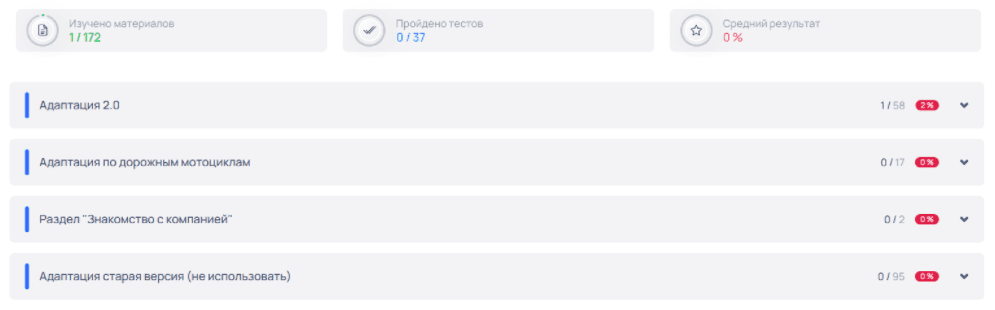
- The informational dashboard section Materials Studied:
- The first number displays the count of studied materials (lessons) across all sections.
What needs to be done for a studied lesson to be counted: View or read the lesson materials. Evaluate the completed material at the end of each lesson. Information about completed lessons will be displayed: In the Materials Studied dashboard. In the list of sections in the informational section at the end of the section: The first number displays the count of studied lessons in the section. The second number displays the total number of lessons in the section. The third number displays the percentage of studied lessons out of the total number of lessons in the section. Within the subsections of the selected section in the Completed Lessons section: If you have only evaluated the completed lesson, then in the list of lessons in the subsection, the corresponding section will show 0%.
- The second number displays the total number of lessons available for study.
- The informational dashboard section Tests Completed:
- The first number displays the count of completed tests.
- The second number displays the total number of tests available for completion.
- The informational dashboard section Average Score: