News
Viewing News
News is displayed on the main page of the corporate portal and in the "News" section of the menu.
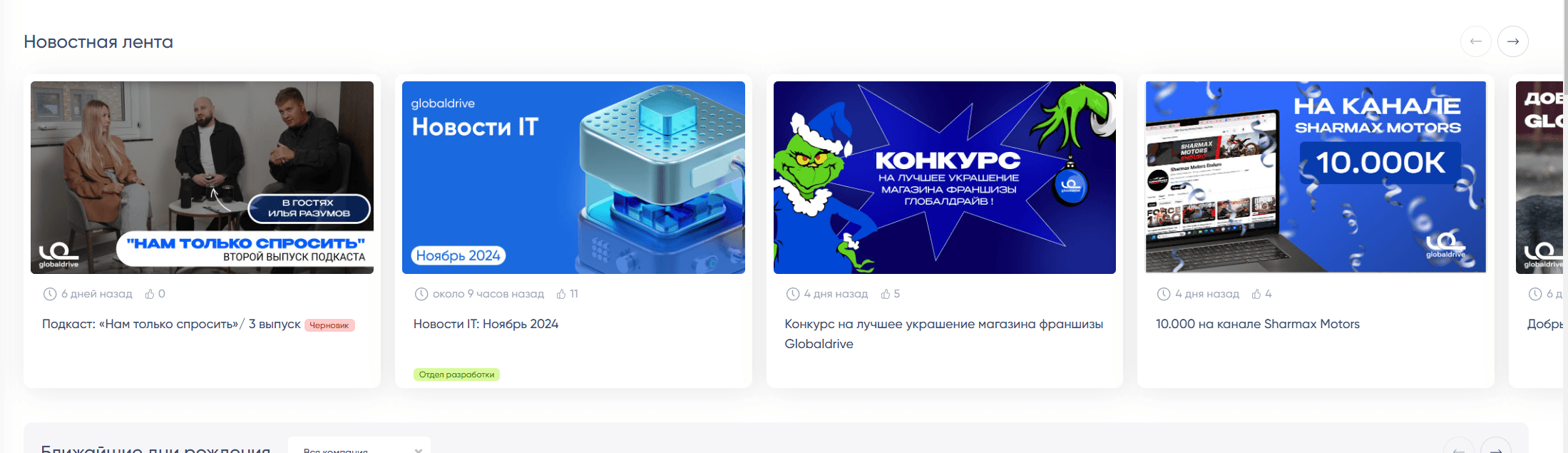
The publication date of the news, an image in 16:9 format, and the department are displayed.
On the news viewing page, you can see:
- Title
- Illustration
- Attached videos
- Number of likes
- Number of views
- "Acknowledged" block — those who explicitly marked and confirmed that they have reviewed the material.
You can also view who has viewed the news, who liked it, and who acknowledged it.
The number of likes updates in the background without reloading the page.
Editing News
During editing, you can set the title, illustration, video, and content.
The text editor allows you to upload photos and directly insert videos (not recommended).
Videos are supported from the following services:
- Youtube
- Videos are likely to not work in Russia without a VPN
- VK Video
- To embed hidden (link-accessible) videos, you need to insert the "embed code," which can be obtained by right-clicking on the video. Instructions can be seen when you attach a video — click on the question mark.
- Rutube
- Embedding hidden (link-accessible) videos is not supported.
Scheduling News
The publication of news can be postponed.
The simplest way is to check the "Draft" box. Until it is unchecked, the news will not be visible to regular users.
A more advanced option is to set a future publication date. Then the news will only be visible when the specified time arrives, and, of course, if the news is not a draft.
The publication date field also helps change the order of news. The most "recent videos" are always shown first, but not by creation date, rather by publication date.